picoCTF: WinAntiDbg0x100
Bypassing simple anti-debugging techniques in a Windows executable through dynamic analysis
contents
#Challenge Info
This challenge will introduce you to 'Anti-Debugging.' Malware developers don't like it when you attempt to debug their executable files because debugging these files reveals many of their secrets! That's why they include a lot of code logic specifically designed to interfere with your debugging process. Now that you've understood the context, go ahead and debug this Windows executable! This challenge binary file is a Windows console application and you can start with running it using cmd on Windows. Challenge can be downloaded here. Unzip the archive with the password picoctf
#This challenge is #1 of a 3 part series
next WinAntiDbg0x200
next WinAntiDbg0x300
#Poking around
First, I tried to run the executable, but had no success:
C:\Users\riv\Desktop\pico\WinAntiDbg0x100>WinAntiDbg0x100.exe


        _            _____ _______ ______
       (_)          / ____|__   __|  ____|
  _ __  _  ___ ___ | |       | |  | |__
 | '_ \| |/ __/ _ \| |       | |  |  __|
 | |_) | | (_| (_) | |____   | |  | |
 | .__/|_|\___\___/ \_____|  |_|  |_|
 | |
 |_|
  Welcome to the Anti-Debug challenge!
### To start the challenge, you'll need to first launch this program using a debugger!
For analyzing, I prefer Ghidra over x32dbg. Searching through program text for the word "flag" yields a few results.
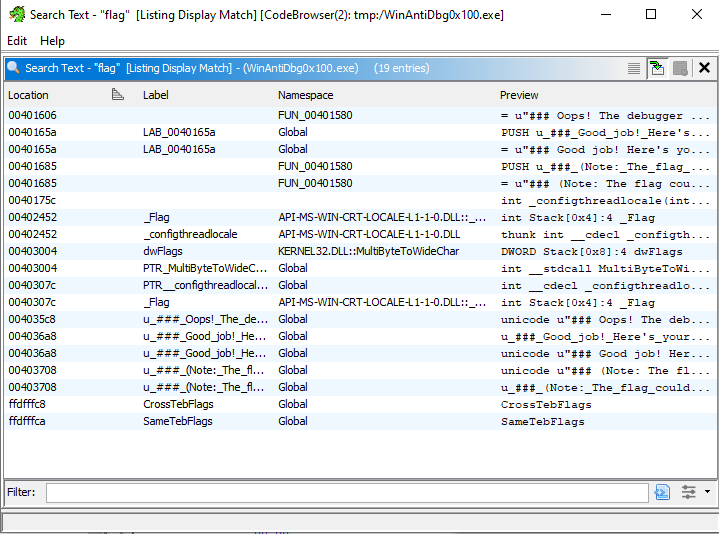
After jumping to them:
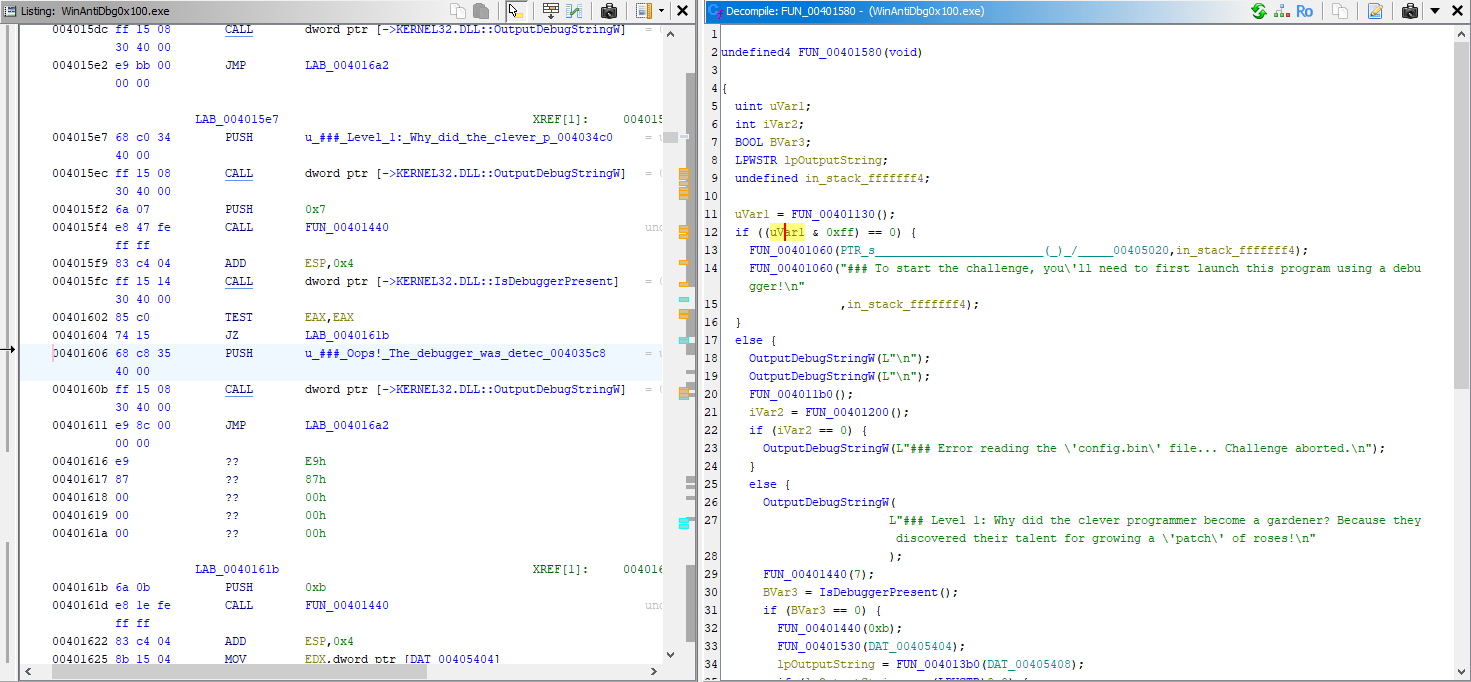
We notice function calls, conditional jumps, and debug checks.
#Understanding the program
Let's understand FUN_00401580, I've left the code below for your convenience:
undefined4 FUN_00401580(void)

{
  uint uVar1;
  int iVar2;
  BOOL BVar3;
  LPWSTR lpOutputString;
  undefined in_stack_fffffff4;

  uVar1 = FUN_00401130();
  if ((uVar1 & 0xff) == 0) {
    FUN_00401060(PTR_s________________________(_)_/_____00405020,in_stack_fffffff4);
    FUN_00401060("### To start the challenge, you\'ll need to first launch this program using a debu gger!\n"
                 ,in_stack_fffffff4);
  }
  else {
    OutputDebugStringW(L"\n");
    OutputDebugStringW(L"\n");
    FUN_004011b0();
    iVar2 = FUN_00401200();
    if (iVar2 == 0) {
      OutputDebugStringW(L"### Error reading the \'config.bin\' file... Challenge aborted.\n");
    }
    else {
      OutputDebugStringW(
                        L"### Level 1: Why did the clever programmer become a gardener? Because they  discovered their talent for growing a \'patch\' of roses!\n"
                        );
      FUN_00401440(7);
      BVar3 = IsDebuggerPresent();
      if (BVar3 == 0) {
        FUN_00401440(0xb);
        FUN_00401530(DAT_00405404);
        lpOutputString = FUN_004013b0(DAT_00405408);
        if (lpOutputString == (LPWSTR)0x0) {
          OutputDebugStringW(L"### Something went wrong...\n");
        }
        else {
          OutputDebugStringW(L"### Good job! Here\'s your flag:\n");
          OutputDebugStringW(L"### ~~~ ");
          OutputDebugStringW(lpOutputString);
          OutputDebugStringW(L"\n");
          OutputDebugStringW(
                            L"### (Note: The flag could become corrupted if the process state is tam pered with in any way.)\n\n"
                            );
          free(lpOutputString);
        }
      }
      else {
        OutputDebugStringW(
                          L"### Oops! The debugger was detected. Try to bypass this check to get the  flag!\n"
                          );
      }
    }
    free(DAT_00405410);
  }
  OutputDebugStringW(L"\n");
  OutputDebugStringW(L"\n");
  return 0;
}#Check #1
uVar1 = FUN_00401130();
if ((uVar1 & 0xff) == 0) {
    FUN_00401060(PTR_s________________________(_)_/_____00405020,in_stack_fffffff4);
    FUN_00401060("### To start the challenge, you\'ll need to first launch this program using a debugger!\n"
                 ,in_stack_fffffff4);
}FUN_00401130()is called, it returns a value stored inuVar1. Then, the program checks whether(uVar1 & 0xff) == 0.- If true, the program prints a message prompting us to start it inside a debugger.
- If false, we continue.
Don't worry about bypassing this, since we'll have to use a debugger anyways.
#Check #2
BVar3 = IsDebuggerPresent();
if (BVar3 == 0) {
    FUN_00401440(0xb);
    FUN_00401530(DAT_00405404);
    lpOutputString = FUN_004013b0(DAT_00405408);
    if (lpOutputString == (LPWSTR)0x0) {
        OutputDebugStringW(L"### Something went wrong...\n");
    } else {
        OutputDebugStringW(L"### Good job! Here\'s your flag:\n");
        OutputDebugStringW(L"### ~~~ ");
        OutputDebugStringW(lpOutputString);
        OutputDebugStringW(L"\n");
        OutputDebugStringW(
            L"### (Note: The flag could become corrupted if the process state is tampered with in any way.)\n\n"
        );
        free(lpOutputString);
    }
} else {
    OutputDebugStringW(
        L"### Oops! The debugger was detected. Try to bypass this check to get the flag!\n"
    );
}
This is the main anti-debugging check we need to bypass:
- The program calls
IsDebuggerPresent(), which returns True (nonzero) if a debugger is detected. - If no debugger is found
(BVar3 == 0), the program proceeds to retrieve and display the flag. - If a debugger is detected, the program prints
### Oops! The debugger was detected. Try to bypass this check to get the flag!.
#Bypassing Check #2
In Ghidra, the if (BVar3 == 0) check corresponds to specific assembly instructions. If we look at the disassembly at address 00401602, we can see:
      00401602 85 c0         TEST      EAX,EAX
      00401604 74 15         JZ        LAB_0040161b
      00401606 68 c8 35      PUSH      u_###_Oops!_The_debugger_was_detec_004035  LPCWSTR lpOutputString for O
               40 00
Understanding the assembly:
TEST EAX,EAXperforms a bitwise AND of EAX with itself, setting the Zero Flag (ZF) if the result is zeroJZ LAB_0040161bjumps to the flag-displaying code if ZF=1 (meaning EAX=0, no debugger detected)- If the jump isn't taken, the error message is displayed
To bypass this check, we'll use x32dbg to:
- Open the program in x32dbg
- Find the TEST instruction
- Set a breakpoint at that instruction
- When the breakpoint hits, manually force the Zero Flag to be set
- Continue execution
When opening the program in x32dbg, the addresses will be different from Ghidra due to how Windows loads executables in memory (ASLR - Address Space Layout Randomization). To find the same instruction:
- In Ghidra, the entry point is at
00401923 - In x32dbg, the entry point might be at something like
006C1923 - The last 4 digits remain the same, so we can find our
TESTinstruction at006C1602in x32dbg
Once we find this instruction, we:
- Set a breakpoint at
006C1602, which is where theTESTinstruction lies - When it hits, edit the
EAXvalue under the FPU window to be 0, indicating that a debugger is NOT present - Continue execution and get our flag
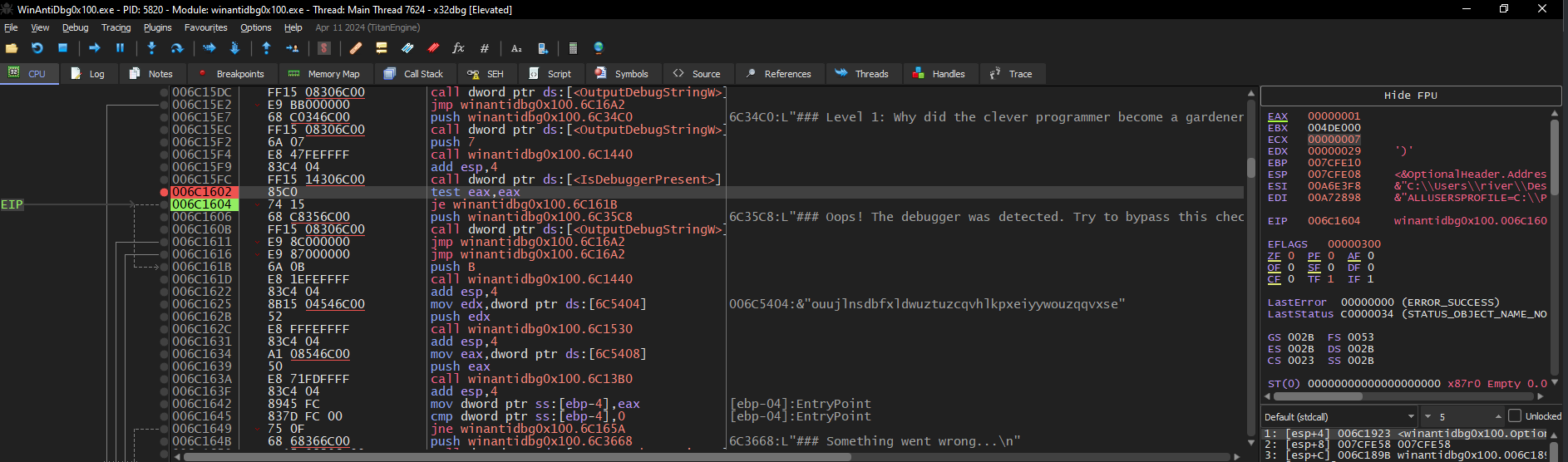
The flag will be under the "Log" tab.
flag: picoCTF{d3bug_f0r_th3_Win_0x100_cfbacfab}